General
General information and help
- Rules
- Troublesome Behavior
- Cheating and Exploiting
- Clean Chat and Messages
- Claim Rules
- Raiding and Trusting
- Griefing and Destruction
- Politics and Controversial topics
- Inappropriate & NSFW Stuff
- PvP Abuse and Trapping
- Interfering with Staffing
- Impersonation
- False Reports
- Alt Accounts
- Punishment Evasion
- Scamming and Baiting
- Litematica and Mods
- No Shulker Farms
- IRL Trading
- Mapart Reselling
- Cross-Server Trading
- Casinos & Money Games
- Staff Discretion
- Economy Rules
- Ranks
- Spawners
- Mob Limiter
- Commands
- Chat Links
- FAQ
Rules
Server rules.
Troublesome Behavior
Harassing, threatening, acting toxic towards other players, and disturbing other's gameplay is not allowed. The use of slurs is also not allowed.
Cheating and Exploiting
Any form of cheating, hacking, or exploiting is not allowed.
This includes x-ray, clear lava, hack clients, auto-clickers, obtaining the seed, lag machines and more. Associating yourself with cheaters may result in a ban.
Clean Chat and Messages
Do not pollute chat by spamming, flooding, etc. Bypassing the chat filter is also not allowed. Keep public chat English, and keep swearing to a minimum.
Claim Rules
You cannot build or grief within 100 blocks of others claims or builds. You may not create claims in the mean to annoy others, or be a nuisance. Reminder: Claims with less than 10k claim blocks will expire after 60 days.
Raiding and Trusting
Raiding unclaimed valuables is fair game. (Chests, shulkers, spawners, etc). Make sure your claim is safe.
Abusing your trust may result in a ban. You must ask others consent before breaking stuff, or taking goods.
Griefing and Destruction
Intentional destruction of the world is not allowed. (Lava casting, mass explosions, rare biome stripping, etc).
Politics and Controversial topics
No politics, controversial topics, or illicit drugs in public chat.
Discussing topics of this nature to intentionally cause issues will result in punishment.
Inappropriate & NSFW Stuff
No NSFW/Bad Names, skins, builds, or chats. Predatory behavior is also not tolerated.
PvP Abuse and Trapping
Do not bypass the PvP system or trap players.
Interfering with Staffing
Calling out hackers in chat or calling out staff that are in vanish is not allowed. Both of these activities interferes with staff doing their jobs.
Joking or pretending to hack or cheat is also against the rules and may result in ban.
Impersonation
Impersonating staff or others is not tolerated. Example: Changing nickname, claiming to be a staff, etc.
False Reports
Refrain from making joke reports about other players, as this wastes our staff's time.
Alt Accounts
Alt accounts are not allowed to vote, keep chunks loaded, or playtime/event rewards.
You may only use it as storage or to play.
Punishment Evasion
Do not use an alt to bypass an existing punishment on another account.
Scamming and Baiting
Do not scam, bait players, rename items similar to custom ones, lowball, etc.
Litematica and Mods
Litematica is allowed, mods such as journeymap and fullbright are also allowed.
Using easy-place or printer is not allowed, and any mods that give an unfair-advantage are also not allowed.
No Shulker Farms
Shulker farms are not allowed under any circumstances to keep the worth of shulkers balanced in the economy.
IRL Trading
All IRL trades which involves real life currency is not allowed. (Example: Paypal, Cashapp, etc).
Mapart Reselling
Reselling of others mapart is not allowed.
Cross-Server Trading
Trading any items on CozySMP for items on another server is strictly not allowed.
Casinos & Money Games
Automated Casinos are not allowed. Tho, you may make games that are not profit-related, or manual such as grass/flower.
Staff Discretion
While our rules provide a clear framework, not every possible situation can be covered.
Staff members are trusted to use their judgment in cases where behavior may be harmful, disruptive, or against the spirit of the community, even if not explicitly listed in the rules. Attempting to exploit loopholes will still be punished.
Economy Rules
Avoid buying out shops of others to empty their stock and re-sell at a higher price.
Do not attempt to manipulate prices to artificially inflate/deflate server-wide prices.
Exploiting new or inexperienced players to make a profit is not tolerated, and will fall under scamming.
Ranks
About ranks on the server.
Donor Ranks
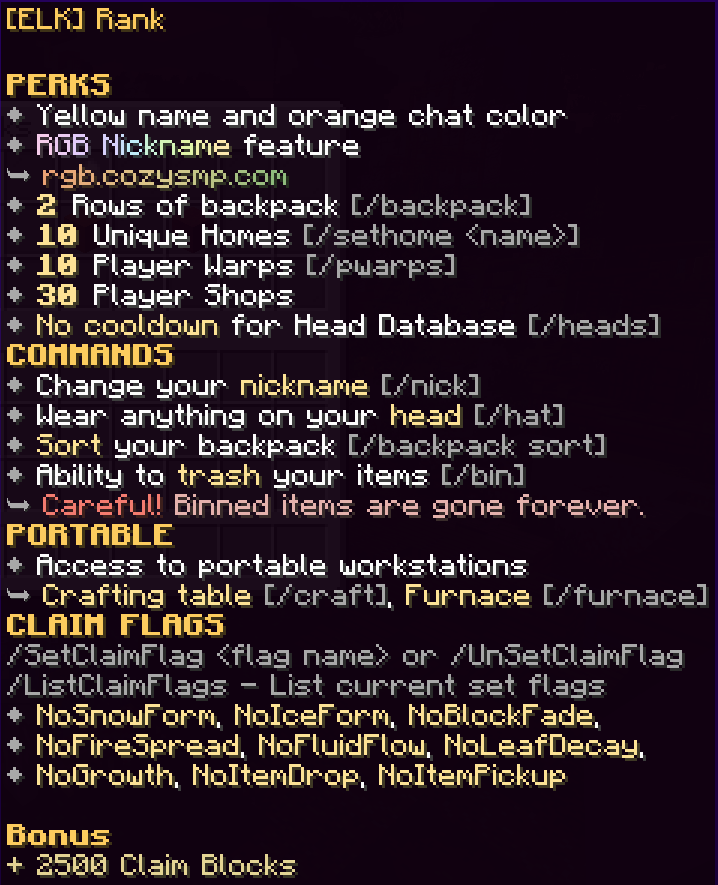
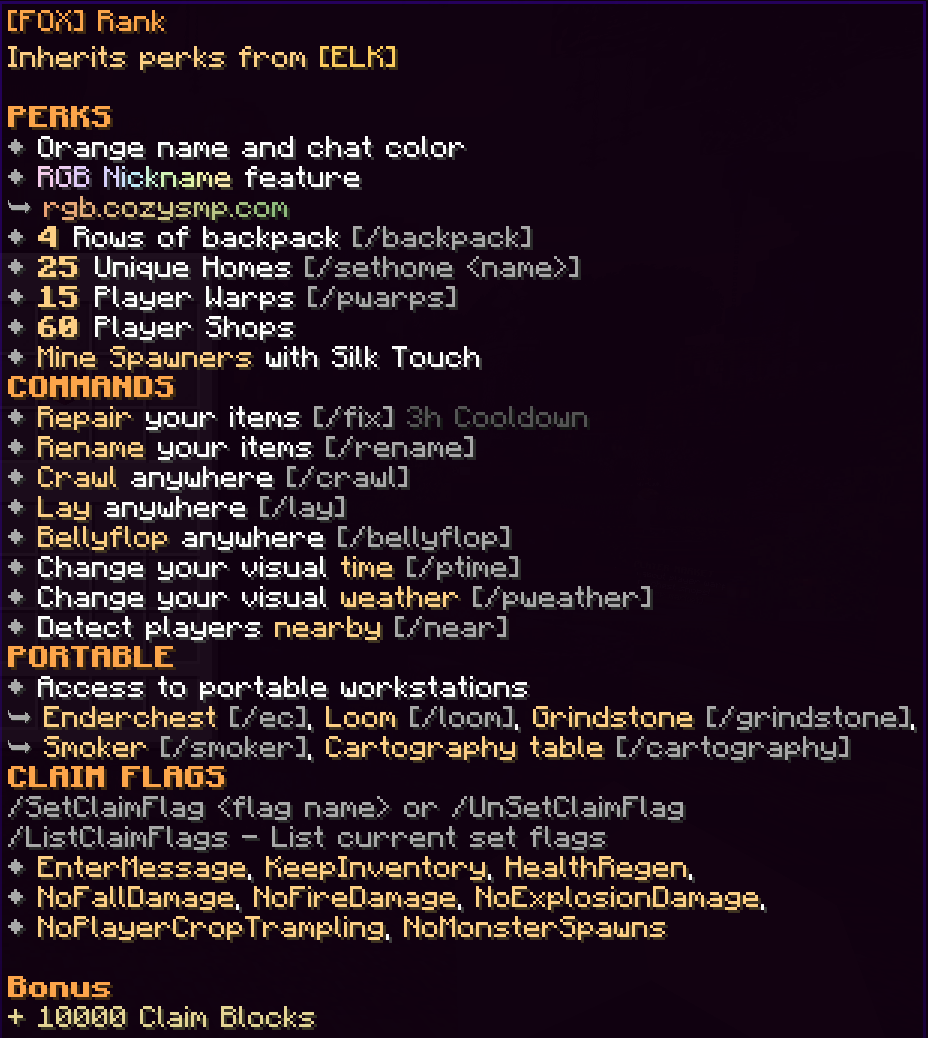
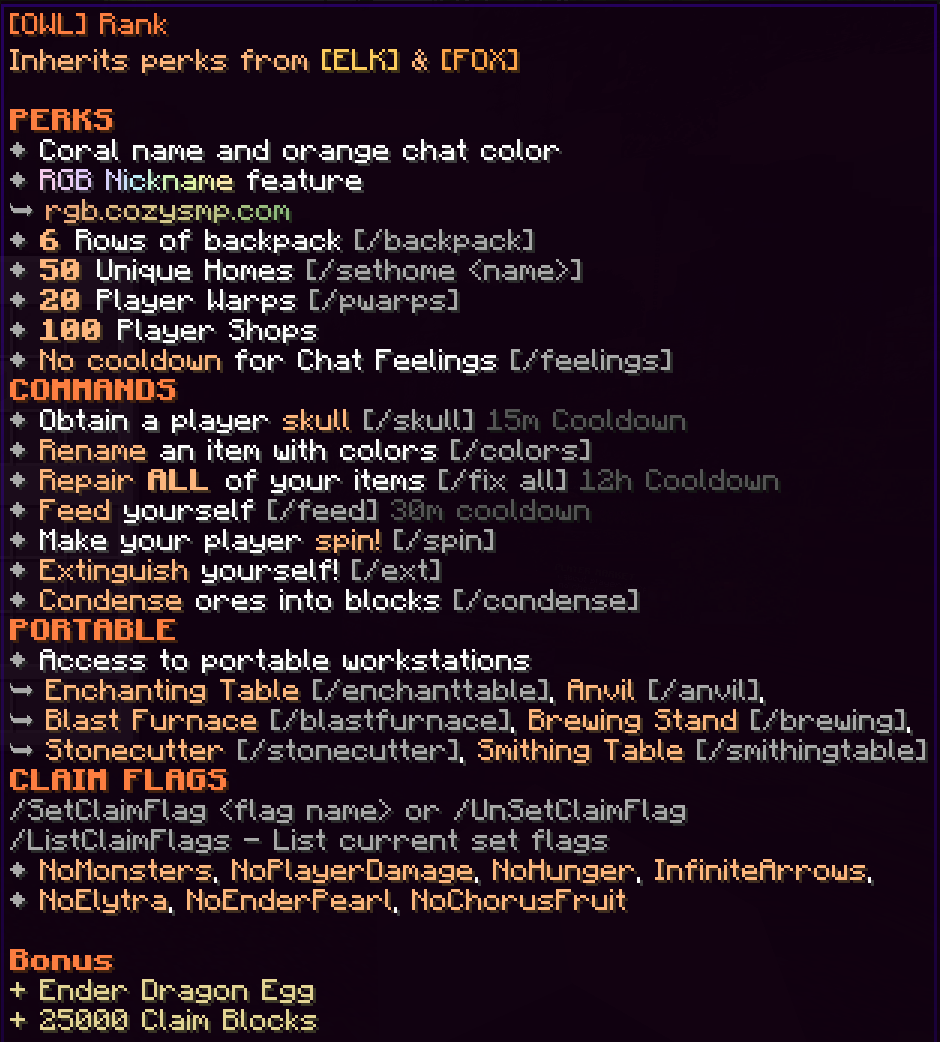
You can buy these at the store or trade ingame vouchers. Obtainable through vouchers in-game for free or by trading them in-game using our traders in spawn! Use [command:warp token] in-game to get to the traders.
ELK Rank
FOX Rank
OWL Rank
Vote Ranks
Note: The perks from the ranks do not stack for limits. For example Seedling+ has 1 Shop Limit (from Seedling) while Sprout has a total of 10 (and not 10+1). Also Vote and Donor ranks do not stack with each other, you only get whichever is the highest.
| Seedling | Starter Rank |
|
| Seedling+ | 4 Votes |
|
| Sprout | 10 Votes |
|
| Sprout+ | 20 Votes |
|
| Fungi | 30 Votes |
|
| Fungi+ |
40 Votes |
|
| Shroom |
60 Votes |
|
| Shroom+ |
80 Votes |
|
| Spore |
100 Votes |
|
| Spore+ |
140 Votes |
|
| Moss |
200 Votes |
|
| Moss+ |
260 Votes |
|
| Petal |
340 Votes |
|
| Petal+ |
400 Votes |
|
| Vine |
480 Votes |
|
| Vine+ |
570 Votes |
|
| Coral |
660 Votes |
|
| Coral+ |
780 Votes |
|
| Flower |
890 Votes |
|
| Flower+ |
1000 Votes |
|
| Azalea |
1400 Votes |
|
| Azalea+ |
1800 Votes |
|
| Blossom |
2200 Votes |
|
| Blossom+ |
2600 Votes |
|
| Lotus |
3000 Votes |
|
Staff Ranks
 @JrMod
JrMods are our chat moderators! They answer questions, moderate chat, and help us maintain a friendly environment on the server.
 @Mod
@Mod
Mods are a step up from JrMod and receive more responsibilities while still handling the same tasks that JrMods do! They moderate chat with better tools, look into hackers, check for XRAY, and more.
@Mod+
Mod+ are Mods with a few more permissions added on! They are better equipped with tools to help assist claim disputes, and are kind of like a mini SrMod in terms of abilities.
 @SrMod
SrMods are the guiding hands of our staff team! They help us train new staff, look into claim issues, handle situations to the best of their abilities if an Admin is not available, and more. SrMods still handle the same tasks as JrMods and Mods, just with some extra responsibilities added on top.
 @Admin
Oversees the staff team and server as a whole, while making the final say regarding situations that may arise. Part of the management team, helps with upkeeping the quality of the server and happiness of the community!
 @Owner
  @Owner
Works on updates, content, and just about anything relating to CozySMP!
Spawners
Custom spawner mechanics.
Natural Spawner Pickaxe
Mine naturally generated spawners with this pickaxe.
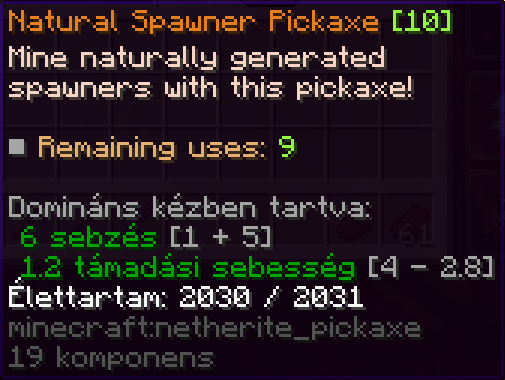
It has a maximum of 10 uses.
Note: After a spawner is placed by a player, it can be picked up with Silk Touch with FOX Rank or above.
Note: Currently if a player places an Empty [item:Spawner] it can only be picked up with this pickaxe.
Mob Limiter
The Mob Limiter automatically detects mobs within a particular radius, and removes them depending on the rules set below. This is in place to prevent lag and make it fair for everyone to play on an equal field. ▸Try the following to avoid having your mobs despawning: ➥ Nametagging your mobs ➥ Spacing out your mobs, so they are not in the same radius.
NOTE: The radius is X blocks for each mob. This means to properly space out your mob counts, it needs to be double the radius for the mob.
- Example: If you want more than 40 villagers, you need the next group of villagers to be 100 blocks away from the other group, allowing for a 50 block radius around both groups individually.
 Mob Limiter Rules
➥ All Entities
Max 15 in a radius of 4 blocks
➥ Villagers
Max 40 in a radius of 50 blocks
➥ Pigs, Cows, Chickens, Sheep
Max 10 in a radius of 20 blocks
➥ Sheep
Max 7 in a radius of 50 blocks
➥ Zombies, Skeletons, Spiders, Cave Spiders, Blazes
Max 10 in a radius of 6 blocks
➥ Drowned
Max 5 in a radius of 25 blocks
➥ Creeper
Max 3 in a radius of 50 blocks
➥ Zombified Piglins
Max 3 in a radius of 50 blocks
➥ Phantoms
Max 2 in a radius of 25 blocks
➥ Turtles
Max 10 in a radius of 5 blocks
Commands
Useful commands with their descriptions
Claims
[command:claimlist] or [command:claimslist]
Displays your current claims and how many claim blocks you have.

[command:claimflags]
Lists the claim flags in the current claim.

[command:setclaimflag] or [command:claimflag]
Sets a claimflag

[command:gnear]
Shows nearby claims
Utility Commands
[command:seen <username>]
Shows players last logout time.

[command:hub] Transfers you back to the lobby
Vote Commands
[command:vote]
General vote information and GUI.
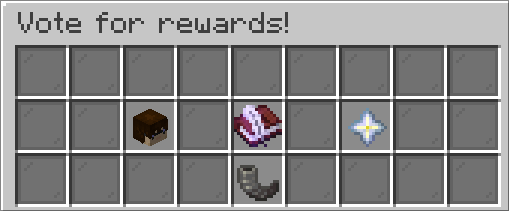
[command:voteall] or [command:votelist]
Displays all the vote links.
[command:votebest]
Displays a GUI with your ??? scores.
[command:votechoices]
???
[command:votegui]
Another vote GUI.

[command:votelast] or [command:vlast]
Displays a GUI with timers for each site when you last voted.

[command:votenext] or [command:vnext]
Displays a GUI with times when you can vote again.

[command:votepoints]
Displays how many times you voted total.
[command:votetop]
Monthly toplist
Warps
Player Warps
[command:pw <target>] or [command:warp <target>] warps you to the target given.
The [command:back] teleports you back from where you last used the warp command.
See some Warps from the {{Warps}} List:
| Warp | Description | Owner | Notes |
|
[command:pw pubfarm] |
J0kee | All crops and trees can be farmed here. Replant everything or you will be banned | |
|
[command:pw QuestMobs] |
Public warp for breeding and killing quests | BuggsyWuggsy | Very good for weekly quest |
|
[command:pw LoveShack!] |
Plz don't kill the animals | BuggsyWuggsy | |
|
[command:pw FreeFood] |
FREE FOOD HERE!! | ItsSticks | |
|
[command:pw ironfarm] |
open again! | .skyshakez | Best AFK iron farm. Also sells Iron blocks for [price:db:3] and ingots for [price:gi:6] |
|
[command:pw ironfarm+] |
TommyTomTom2002 | Iron farm + enchanted books for [price:di:1] | |
|
[command:pw FreeSugar] |
Get free sugar cane here! | kdotfanboy |
| Warp | Description | Owner | Notes |
|
[command:pw Mart] |
EVERYTHING - You can find every item here! | ItsSticks | |
|
[command:pw Aqua] |
2 floors full of rares and necessities! | AquariusPiplup | |
|
[command:pw Jeszi] |
Items 4 new and old players. Nearly all u need. | Jeszi86 | |
|
[command:pw anime] |
Netherite Armor, High-low End Goods! | AnimeJunikie88 | |
|
[command:pw CelsSells] |
Rares and Wonders, all at a reasonable price! | Xcle | |
|
[command:pw Shop] |
Sell your Pumpkin Candies downstairs! | I_Kant_Splel | |
|
[command:pw EclipseGallery] |
Art | EclipseRose |
- [command:pw xp+]
- [command:pw FurnacePyramid]
Creating Player Warps
Use [command:pw create name] to create a new player warp. You have have to pay 5 diamonds for the warp.
Workbenches & Perks
Backpack
[command:backpack] or [command:bp] opens your backpack.
Note: Only available for Spore rank (1row) or above. Or ELK rank (2rows) or above.
The items stored in the backpack are not dropped on death.
Crafting Table
[command:craft]
Note:Only available for Azalea+ rank or above. Or ELK rank or above.
Ender Chest
[command:enderchest] or [command:ec] opens your enderchest.
Nore: Only available for Lotus rank. Or FOX rank ore above.
Party Pond
Target Info
[command:vparty] or [command:voteparty]
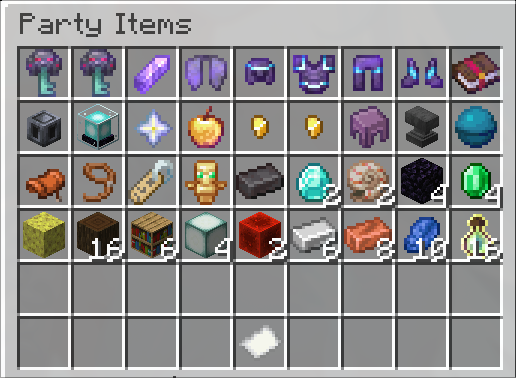
Displays the current status for Party Pond. How many votes are needed from the 200 for the next Party Pond

Items
[command:partyitems] Displays a GUI with the possible items from party pond and also their chances.
Colors
For use with [command:rename]
See [command:colors list] too.
| Black | &0 |
| Blue | &1 |
| Green |
&2 |
| Cyan | &3 |
| Red | &4 |
| Magenta | &5 |
| Orange | &6 |
| White | &7 |
| Bright Black (Gray) | &8 |
| Bright Blue | &9 |
| Bright Green | &a |
| Bright Cyan | &b |
| Bright Red | &c |
| Bright Magenta | &d |
| Yellow | &e |
| Bright White | &f |
| -- RESET -- | &r |
| BOLD | &l |
| ?? OBFUSCATED ?? | &k |
Chat Links
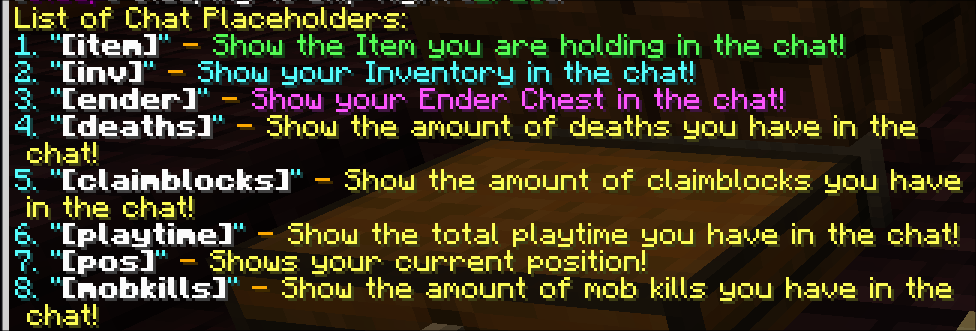
Chat palceholders from the interactivechat plugin.
Information
Chat links are simple text like [i] entered in the chat as it is (between square brackets) to do additional functionality.
All commands can be linked for example to link [command:pw pubfarm] just enter [/pw pubfarm] in your message for others to use it simply.
For an ingame list of all the placeholders see [command:interactivechat list]
Item Link
[i] links the current held item.
Note: Sometimes for shulkerboxes there is too much NBT data and the link breaks. In this case use [inv] instead
Inventory
[inv] in the chat links your whole inventory.
Deaths
[deaths] Shows the amount of deaths you have in the chat
Ender chest
[ender] Shows your ender chest in the chat
Claim Blocks
[claimblocks] Shows the amount of claimblocks you have in the chat